Monday, November 19, 2018

How to Claim Your Local Business Listings on Bing and Yahoo!

Believe it not, Google really isn’t the only game in town, search-wise that is. There are other search engines that still matter, and some that aren’t even actually search engines but still matter. Google is a company that offers a wide spectrum of products to integrate with search, which is its flagship product. Bing, on the other hand, is a straight-up search engine that powers other search modules. And Yahoo!, while not a search engine, is a web portal with a Bing-powered search engine. And a good number of people use Bing and Yahoo! instead of Google.

So your Bing business listing and your Yahoo! business listing matter more than you may realize. In fact, quite a few people prefer Bing over Google for the simple fact that it is more aesthetically pleasing. So why would you want to limit your marketing reach by getting your crucial business listings on Google alone?

Why Bing and Yahoo! Still Matter

While Google still dominates search, an unignorable 20+% – that’s one out of every five, at least – of all searches still happen on Bing, Yahoo!, and other places. Just three years ago, Bing accounted for a hair over 20% of desktop searches, and Yahoo!, 12.1%. While those figures have fallen some, that’s a significant volume of non-Google searches.

More current figures show that Google retains an average net share of search volume of about 74.5%, with Bing and Yahoo! averaging between 5% and 10%.
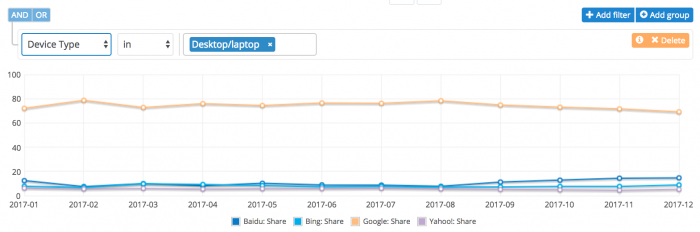
average net share of search volume

(Smart Insights)

Although 5-10% may not seem like a lot, consider that almost 50% of the world’s population accesses the Internet. That’s half of 7.6 billion people, and just 5% of that is a huge number!
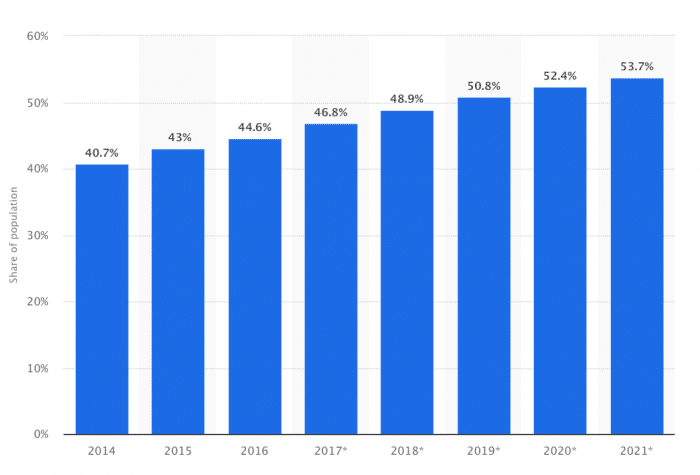
share of population

(Smart Insights)

In addition, Bing may have the edger over Google in mobile friendliness owing the more pleasing display features. And mobile search is doing nothing but growing bigger and bigger, accounting for well over half of all searches worldwide.
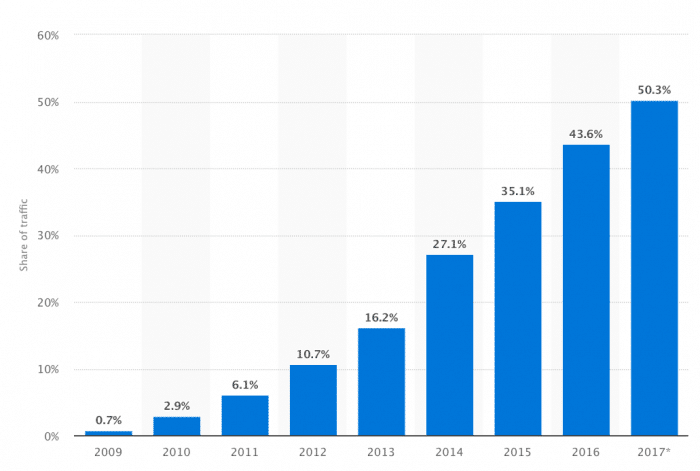
share of traffic

(Smart Insights)

If you don’t use Bing and Yahoo!, then, you could be leaving up to 20% of your marketing reach and profits on the table. It’s just sound, basic search engine optimization (SEO).

What Bing and Yahoo! do Better than Google

Besides a sizable chunk of search volume going to Bing and Yahoo!, they also do some things better than Google – and that’s why not a few people still prefer them.

Bing tops Google in . . .

Image search – The first to offer “infinite scroll,” Bing also serves up on the results page sharper, higher-quality images. Bing also does a better job with filters, including more accessible licensing information.
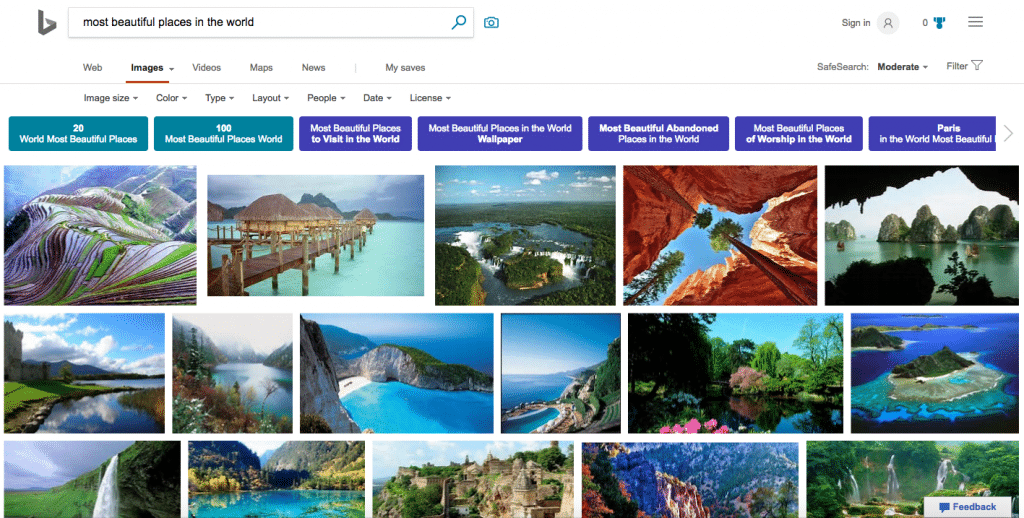
image search

(Search Engine Watch)

Social Media Integration – According to Search Engine Watch, “[w]hen it comes to social media integration with the SERPs, Bing is the clear winner. It would have been remiss of Bing not to take advantage of the deals between parent company Microsoft and Facebook and Twitter. With more access to social data, Bing results feature trending news from social media in the news search results.”

Video search – Google may own YouTube, but Bing makes video search a much more pleasant experience with the grid of video thumbnails that allow you sample videos without ever leaving the SERPs.

And Yahoo! beats out Google in these areas . . .

Homepage – Yahoo! has a more comprehensive homepage with more information and more options and with greater visual appeal.
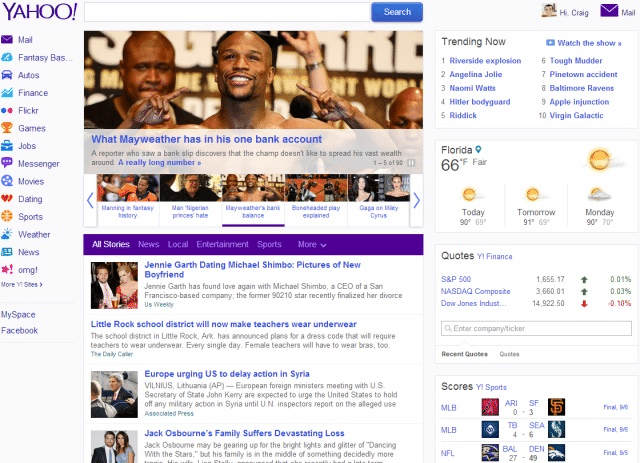
yahoo home page

(MUO)

Local-search experience – Yahoo! has been at the local-search game much longer than Google. “Yahoo! Local was the web’s first local search engine where you can see businesses and services in your area” (MUO).

Q&A database – Google doesn’t have a branded equivalent of the same caliber as Yahoo! Answers, which has been called “one of the most valuable question-and-answer databases on the entire Internet.”

How Search Engines Gather Data About Your Business

Now, before jumping into how to claim your Bing business listing and your Yahoo! business listing, it might be a good idea to examine how search engines actually gather data about your business, especially for the purposes of local search . . .

All the major search engines rely on third-party data providers for nearly all the data that shows up in their local business listings. These data providers include aggregation houses such as Acxiom and InfoUSA, common Internet Yellow Page type sites such as Superpages and Merchant Circle, and social media review sites such as Yelp and iBegin. With such a complex ecosystem of local business data, it’s important to claim your listings to consolidate all this fragmented business information under a profile that is under your own control.

Claiming your listing is also the best preventive measure against your listing being hijacked by an unscrupulous competitor, misrepresented with inaccurate information, or merged with a competitor’s data. It’s also the very first step in being able to actually optimize your business listing by hand – and the best way to ensure that your business does well in local searches.

How to Claim Your Bing and Yahoo! Listings

It’s fairly easy to create your business listing at Bing and Yahoo! Just sign up as a user at each of the respective business centers. Then, either search for your business by name and address, or add the business location by following the relevant instructions.

While you’re filling out the required business information, ensure that you’re using the Doing Business As (DBA) for your business and that you’re maintaining a consistent format for your Name, Address, and Phone Number (NAP). It’s important that you fill out this information as accurately as possible so search engines can find your business in the third-party business data they draw on and associate it accurately with your business profile. Complete your profile as comprehensively as possible:

  • Provide a keyword-rich business description.
  • Complete all the fields for business information, such as hours of operation, payments accepted, services offered, certifications, awards, parking availability, etc.
  • Upload or link to the maximum allowable number of business images and videos.

When you are ready to verify your information, you will be either contacted via:

  • Phone with a secret pin code to verify your identity, or
  • Postcard mailed to your business location.

Once you have verified your information, you now control your local business listings and optimize your online listings.

How to Set Up Your Bing Local Listings

bing listings

And here are the specific steps to claim your Bing business listing:

  1. Go to Bing Places and click “Get Started.”
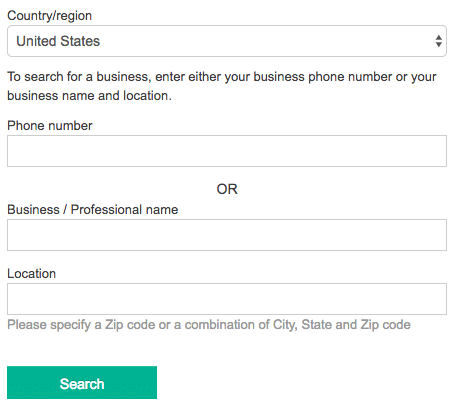
  2. Accurately enter your business details and information – phone number, business name, address, and so on – and then click “Search.” The form looks like this:form sample
  3. You should then see your business in the returned search results. Click the green “Claim Business” link that will appear to the right of your business name. If you haven’t logged in to your Microsoft account, you will then be asked to do so. After logging in, proceed to the next page.
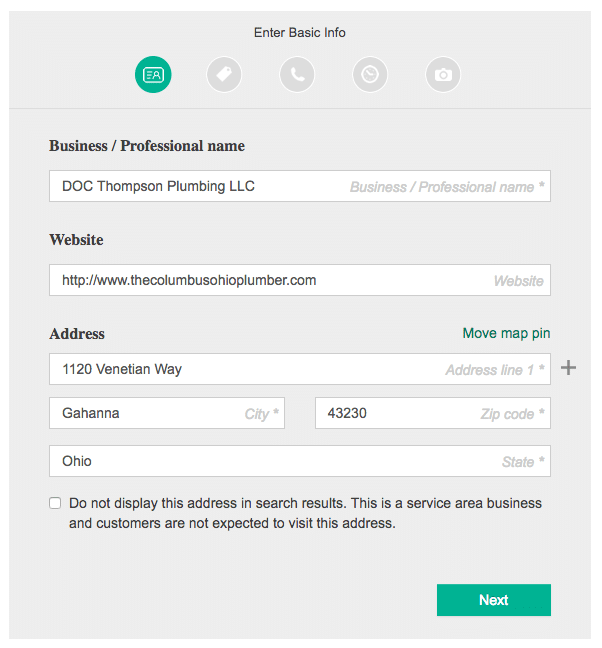
  4. With this page, you get a chance to review your business information, making sure everything is correct:
review form

Make sure all the information you see is correct and accurate for best performance in local search on Bing. Click “Next” to go to the next section, and after that hit “Submit.”

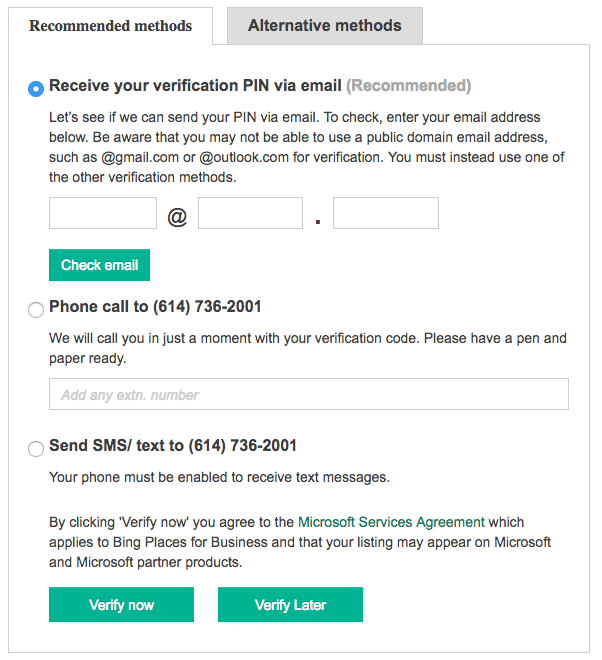
  1. Finally, you have to verify your business listing here:
verify listing

Choose your preferred option for receiving your verification PIN or code and just follow the directions.  After you verify your business, you’ll receive a confirmation notification from Bing Places indicating that everything is on order and you’re all set.

How to Set Up Your Yahoo! Local Business Listings
yahoo listings

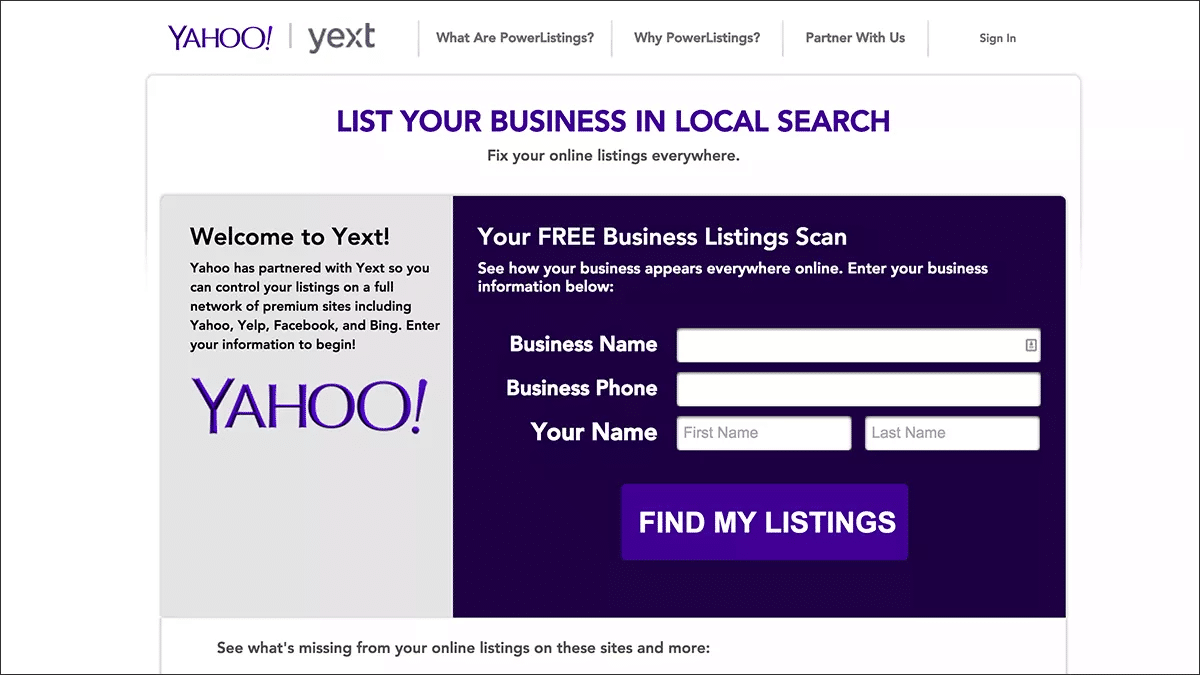
Nearly one of every eight searches in the US is conducted through Yahoo!, so, yes, you do indeed need a local business listing there. And in 2015, Yahoo made it easier by “bundling more options to publish your listing across multiple publisher sites” and moving them to Yext. This move enabled “local marketers to manage their listings for free on Yahoo or to upgrade to Yext’s PowerListings data syndication product . . . across a partner network of sites, which include Bing, Yelp, Facebook, Foursquare and others” (Search Engine Land).

Here’s how to set up your free local business listing on Yahoo! (which is very similar to the process with Bing) . . .

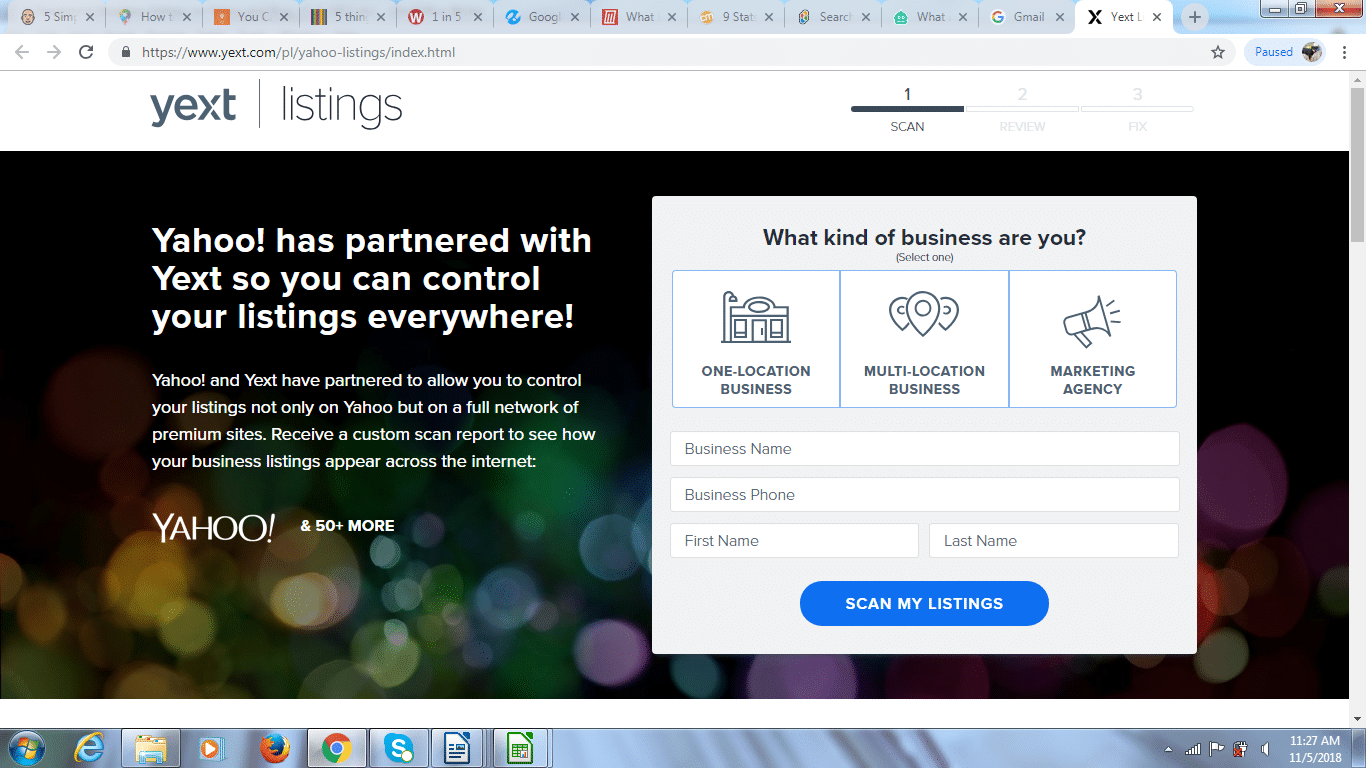
  1. Go to Yahoo!, search for your business, and you’ll be taken to this Yext form:yext form
  2. Enter your business information, and then click “Scan My Listings.”
  3.  The next page you will be taken to may seem a little off-putting with all the warnings you’ll see, but just go ahead and click the “Continue” button.
  4. At the next page, fill out or update your business information and details, making sure to fill out the page completely. Also, be sure to use the same name, address, and phone number (NAP) as you did on your Bing business listing and everywhere else. Then click “Continue.”
  5. The next Yext page will offer you some paid plans. Just look below these for the small link saying “Claim your Basic Listing in Yahoo.” This is the link you’ll want to click for your free Yahoo! business listing.
  6. And this brings you to the “Yahoo Basic Listing Checkout” page, which you’ll need to complete and then click “Place Order.”
  7.  As with Bing, the final step is verification. You will receive an email asking you to verify your email address and to log in to your account. Just click the link, create a password, and login. After this choose your preferred option to verify that you actually represent the business, then verify, and you’re good to go.

Best Practices in Claiming Business Listings

There a few best practices to ensure that you fully leverage your free Bing business listings and that you take fall advantage of your free Yahoo! business listings, for example:

  • Do not create duplicate business listings when claiming an existing unverified listing.
  • Create only one listing for every physical brick-and-mortar location you have.
  • Follow the listing guidelines for each of the major search engine local business centers.
  • Do not use call-tracking phone numbers as part of your listing.
  • When possible, use a local phone number rather than a toll-free number for additional ranking power.

Get the Most Out of Your Local Bing Business Listing and Local Yahoo! Business Listing

You may think that all this sounds like a lot of bother. It may be, but it’s also absolutely critical. For local search is rapidly becoming the most important element in SEO and marketing for businesses with a local presence. Just consider . . .

  • “96% of PC owners conduct local searches”
  • “46% of all Google searches are local”
  • “64% of local customers use search engines and directories as their main way to find local business”
  • “50% of local mobile searches look for business information”
  • “A whopping 78% of local mobile searches result in an offline purchase” (BrightLocal)

While these figures apply chiefly to Google, the same phenomenon obtains for both Bing and Yahoo! If  you want local customers to find your business, you simply have to have your business in these local listings. The key ingredient here for local businesses that want to increase traffic to their websites and through their doors is local SEO – which is way different from ranking high in the SERPS for a general search term.

There’s a lot more to it, though, than just filling out the forms and getting your information in the business listings on Bing and Yahoo!. You also have to know how to do what it takes to get your business in these listings in a way that will drive local traffic to your business – at the precise time potential customers are searching for the products or services you offer.

But you’re not an SEO expert, and, besides, you have a business to run. What you need, then, is the assistance of a digital marketing agency so that you can spend your time and talent running your business while at the same time reaping the many benefits of a local marketing plan – one that works for you right now and all the time.

Help with Your Business Listings

Contact Fingerprint Marketing today if you want to get your business on the “local map.”

Finally, even though we’ve been talking about Bing and Yahoo!, there’s still the big player Google – which, obviously, you can’t neglect. If you want to get your business on the top of the local search results on Google, take a look at our comprehensive guide on Google My Business.

The post How to Claim Your Local Business Listings on Bing and Yahoo! appeared first on Fingerprint Marketing.


Repost https://fingerprintmarketing.com/how-to-list-my-business-on-yahoo-and-bing/ fingerprintmarketing</>http://fingerprintmarketing.com/

Monday, November 5, 2018

How Marketers Leverage Google Personalized Search

Marketers generally like to use every tool available to get an edge – as they should. A fairly new twist to SEO and online marketing comes about as a result of Google’s increasingly personalized search results. The challenge with these new Google personalized searches is pinning down their accuracy due to the multiplied SERP variations. And that means a tougher time ensuring the search data is right for sound SEO purposes.

Still, effectively leveraging Google’s personalization can give you a definite marketing edge. So let’s see how personalized search results are affected by location, device type, search history, and many more factors.

What Are Personalized Search Results?

Google personalized search results are based on more than the traditional ranking factors like relevance and authority. Personalized results take into account additional information the search engine has about a user at the time of the search, for example, demographics, location, search history, and interests. The putative goal of personalized search is to enhance the relevance of the search results for a particular searcher.

Formerly, the main goal of SEO was to get to the top of the first page of Google (and other search engines) for a specific keyword or keywords. Not anymore, though, because that approach doesn’t account for specific, individual users. Now, in order to deliver the most relevant search results (as well as offering a more profitable ad experience), Google is increasingly attempting to custom tailor and personalize SERPs.

Personalized search results are based on a host of individual factors: whether you are signed into a Google account, past search history and evident interests, Google+ profile, time and date, and location. The idea is to serve up the results and content that will best satisfy your needs as a searcher. What this means in practical terms is that someone searching for, say, “affordable dentist” from Seattle using a Google Chrome account from a mobile Nexus 6 Android device at 6:00 pm will get much different results from a person searching the same keyword from Bellevue at 10:00 am on a laptop and not logged in to a Google account.

Current Trends in SERP Personalization

Chief among the trends in SERP personalization is the blending of contextual search results and personalized search results. Up until fairly recently, there had been a pretty clear line of demarcation between the two, but now not so much owing to progressively more sophisticated search engine algorithms. Contextual results used simple data points to add a layer of context to search results. Personalized results use those same data points along with more complex ones to achieve a search experience that is both contextualized and personalized – completely custom, seamless, and tailored for every distinct searcher and query.

Another major trend in SERP personalization involves resistance to over-personalization and concern about personal data tracking. Users have expressed concerns about intensive tracking of their browsing habits and personal information and about how that information was stored. The same thing has impacted marketers who had to use an incognito browser window in order to run a Google search that would allow them to view a universal listing rather than personalized results.

In addition, Google has begun to realize that there are some problems. Although they have well developed capabilities to understand the likely intent of queries and match them up with snapshot results, their interpretive abilities aren’t as strong. Google is less able to accurately predict the current desires and intent of searchers because past behavior may not be all that relevant in the present. As a result, Google has announced that they will scale back the scope of personalized searches to concentrate more on location and most recent user searches.

This last trend may make it easier for marketers to measure and track SEO efforts. In theory, marketers won’t have to worry about so much variation in SERPs from one individual searcher to the next. With customizations influenced primarily by the nature of the search query – and less by individual searcher characteristics – things become much more manageable.

But keep in mind that this is still largely conjectural, and Google personalized searches are still going strong. So fully leveraging personalized searches requires extensive SEO expertise in this area.

Which Factors Influence the Personalization Algorithm?

The many factors influencing the personalization algorithm include:

  • Where a searcher is located geographically
  • The type of device and operating system a searcher is using
  • The specific browser used
  • Search history, including kinds of searches, sites visited, and click history
  • Visit history and frequency for specific domains, with more engagement having greater influence
  • Google+ data, especially searches, shares, and links
  • Searches related to Google Calendar for Gmail users
  • Bookmarks for Google Chrome users as another indicator of visit frequency

How Search History Influences Search Results

Personalization on Google for searches is fairly heavily impacted by previous searches, especially the search results a user has clicked on and the browser history. This information allows Google to “understand” a user’s interests and then tailor the search experience accordingly.

According to SEO PowerSuite, “Google creates a personalized profile for every searcher based on their browsing history, search history, and SERP clicks, and subsequently alters the search results we see based on our interests.” And that’s where it gets tricky for marketers in their personalized search SEO efforts.

The difficulty lies in checking and tracking rankings. As with the Heisenberg Uncertainty principle, that which is observed is influenced by the action of the observer. So checking rankings influences the results observed – precisely because they are personalized. And on top of that, if a user clicked on your competitor in a search, that competitor will rank higher for that searcher because that click is part of the user’s search history used for personalizing results. In this scenario, search results will be personalized for your competitor, and you won’t know where you really stand SEO-wise.

Why Is Device Type an Important Personalization Factor?

device type

Even the type of device used is an important personalization factor, especially considering the wide divergence in SERPs for desktops/laptops and mobile devices. It is “probably fairer to call Google mobile a distinct search engine in its own right – one with its own set of ranking factors” (SEO PowerSuite).

Pages rank differently and queries are interpreted differently between desktop and mobile devices because of the algorithm’s emphasis on mobile friendliness. The significance of authority and relevance remain pretty much the same across the board, but pages that are not optimized for mobile devices are either ranked significantly lower or removed altogether. Basically, mobile-friendly pages are lifted higher in the SERPs.

For personalized SEO, then, the task becomes monitoring desktop and mobile rankings separately, as if you were dealing with two different search engines. And then you should probably put more effort into optimizing for mobile – because more than half of Google queries originate from mobile devices.

Understanding the Importance Location Targeting

Location targeting, basically Google search GPS, is another highly important aspect of personalized search and must be taken into account for effective SEO. Google knows every searcher’s location and uses that bit of information for offering personalized search results. Google can track your location best through a mobile device, with surprising accuracy and precision. But even if you’re not using a mobile device, Google can get a good idea of your location from your IP address and still do location targeting.

Using your geographic location, Google puts businesses and other relevant places nearest to you higher up in the organic personalized results. Location targeting comes into play primarily when searches indicate or imply that a searcher is looking for a physical business – which is why it is such a critical SEO factor for local businesses.

The problem for SEO here is (again) tracking rankings when there is such a wide variance in results. For example, searchers in the same city, but just a few miles apart, can see different search results when searching for the exact same term. With location changing search results so much, effective rank tracking gets more difficult.

What you have to do is determine your target locations and then set up a rank-tracing strategy, as well as the tool(s) you use, to monitor rankings for each of the different target locations. And, again, this is especially critical for local business with a physical presence. The key here is using a marketing firm with local SEO expertise.

How to Use SERP Personalization When Marketing to Your Audience

There are a few things you can do to ensure you show up higher in results for SERP personalization, such as:

Dialing in and Refining Keywords

Search results may be personalized now, but keywords remain just as important as ever. And this includes pages that aren’t primarily search landing pages because of what is called “personalization bias.” This is the phenomenon resulting from personalization whereby people who are “biased” toward your brand and click on your results are served up search results with your brand higher in the rankings. So every page needs keyword targeting, especially now that personalized search is here.

Being in the Places that Matter for Location Targeting

Getting your business in all the relevant places is the first step – Google+, Google My Business, Google Maps, and so on. In addition, you have to ensure that your content is actually helpful for searchers in those locations.

Using Google+ for Content Sharing

Google+ factors into personalized search, so don’t neglect it. Not only can you get traffic directly from sharing content on Google+, but people who click on your offerings will then see you higher in the rankings for similar searches because their searches are personalized according previous clicks and site visits.

Striving for Multi-Device Friendliness

The type of device used for searching is a huge factor in personalized search results. The upshot, then, is that you have to strive for multi-device friendliness, but maybe with a greater emphasis on mobile.

Personalize Your Search Engine Before SEO

Success in personalized search marketing begins before you do any personalized-flavored SEO. You “can perform better in personalized search . . . by thinking about things like getting potential searchers to know and love your brand and your domain before they ever make the query. It turns out that if you’ve gotten people to your site previously through other forms of navigation and through searches, you may very well find yourself higher up in people’s personalized results as a consequence of the fact that they visited you in the past” (Moz).

The great thing about this pre-SEO tactic is that it can snowball, gaining momentum and growing larger as it rolls along. If you get people to engage with your brand, you will later show up higher in the search results they see. And that means they are more likely to click on your links, which makes you show up, owing to personalization, even higher in the results they see the next time. You just keep ranking higher and higher in increasingly more of their search queries. And so on and on.

What this means, then, for your online presence, with respect to personalized search, is that you have to do some “pre-marketing” for your brand. And that also means you need a marketing partner who can do the job well.

google seo

Fingerprint for Google Personalization Success

SEO is now about more than merely getting found online by showing up high in the SERPs. It is also a matter of showing up high in the personalized search results for those people who are your exact target market. It’s a new challenge that calls for some new tactics used alongside the old tried-and-true ones that have always worked.

But do you want to have to learn all that new stuff, or would you rather concentrate on running your business? That’s where Fingerprint Marketing can help. We understand well the strategies that will help you show up in the SERPs for the right people and will bring you more local business. Our team has the qualities you need on your team. They are inventive and creative and geeky so that you can “reap the benefits of a sizzling marketing plan.”

To discover how we can help you with the challenges of personalized search, contact us today!

The post How Marketers Leverage Google Personalized Search appeared first on Fingerprint Marketing.


Repost https://fingerprintmarketing.com/personalized-search/ fingerprintmarketing</>http://fingerprintmarketing.com/